

HubSpot Vibe Contenting Done Right.
Finale Composer reads your theme and generates AI content and modules that match your brand - no code bloat, no copy-paste, no broken layouts.
The Issue
Vibe Contenting Is Not The Problem. Doing It Poorly Is.
AI has unlocked a wave of tools that can generate an entire website, a landing page, or a full HTML layout from a single prompt, and new ones launch every day. For rapid prototyping and exploring design ideas? Genuinely useful.
But when you take that AI-generated HTML and drop it into a HubSpot page, you're going to have a bad time.
Book A Demo
Book A Demo
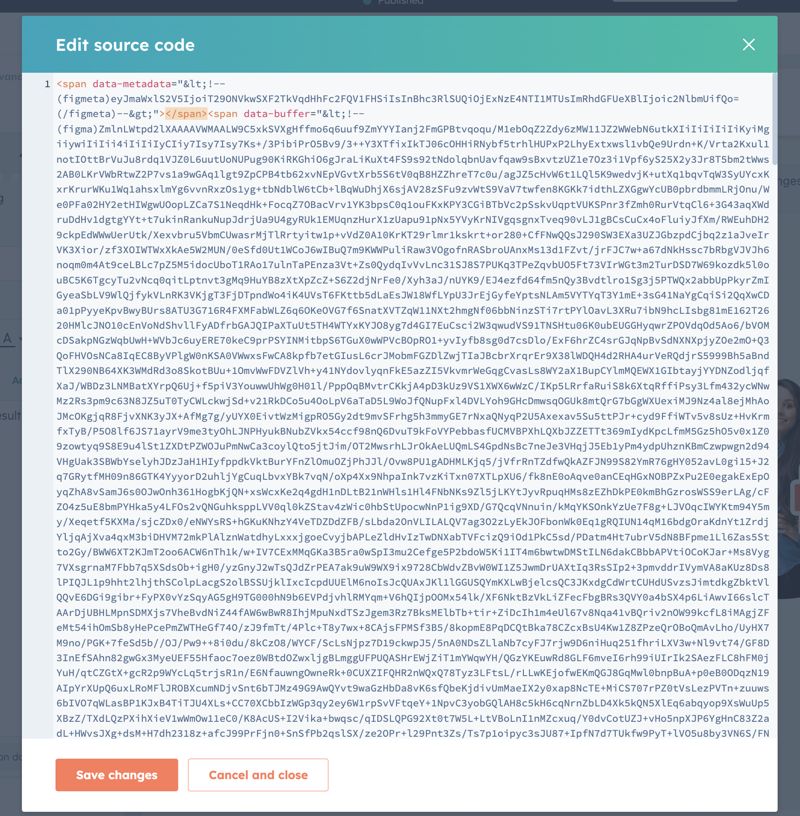
Actual example of insane HTML code seen on a client site where content was created with an external AI tool.
Your Theme Disappears
The code is bloated
SEO Takes a Hit
Accessibility Gets Ignored
The problem isn't vibe contenting. The problem is doing it with a tool that doesn't know HubSpot.
The Solution
An AI Content Tool Built for HubSpot. Not Retrofitted for It.
Finale Composer lives inside HubSpot's page editor as a native custom module. It already knows your theme: your primary and secondary colors, your heading and body fonts. Every piece of content it generates is built from that foundation, not layered on top of it.
No theme overrides. No bloat. No copy-paste from a tool that has never heard of HubSpot.
Reads Your Theme
Clean, Purposeful Code
No full-page resets. No inline style soup. The generated HTML is scoped, lean, and structured to play well with HubSpot's rendering engine and your existing page styles.
Built To Perform
The Process
Describe It. Preview It. Publish It.
- Install once.
Connect your HubSpot portal via OAuth. Finale Composer installs itself directly into your Design Manager. No CLI. No file uploads. No developer needed. - Add the module to any page.
Drag Finale Composer onto a page in HubSpot's editor. It's ready immediately, with your theme data already loaded. - Describe what you want.
Type your prompt in the chat panel. Attach a brand image, a product photo, or a PDF to reference. Be as specific or as loose as you want. - See it live before you commit.
A sandboxed preview renders your content instantly, with real fonts, real colors, and real layout, right in the editor. Refine it with follow-up prompts until it's exactly right. - Publish.
Copy the HTML into the Generated Content field, flip the module to Display Mode, and publish. Your visitors see the finished content. The builder stays hidden.

What's Included
Everything a HubSpot Content Team Actually Needs
True Theme Awareness
Reads your HubSpot theme's primary color, secondary color, body font, and heading font. Every generation starts from your brand, not a blank slate.
Conversational Editing
Each follow-up prompt refines the last result. The AI carries full session context, so "make the headline shorter" does exactly that without regenerating everything from scratch.
Attach Files & Images
Upload an image or document, or pick one you already have in HubSpot's File Manager. No re-uploading files you uploaded last week.
Duplicate File Detection
Attaching a file that already exists in your File Manager? Finale Composer asks whether to use the existing one or replace it. No silent file pileup with -1, -2, -3 suffixes.
Multiple Instances Per Page
Run several Finale Composer modules on a single page: hero section, feature grid, testimonials. Each is fully independent with its own content and prompts.
Your AI Key, Encrypted
Bring your own Anthropic, OpenAI, xAI, or Gemini API key. It's encrypted on the server and shared automatically across every module in your portal. Set it once and it's done.
Your Files Stay in HubSpot
Uploads go directly into your HubSpot File Manager. Not third-party storage, not a CDN we control. Your assets live where you already manage them.
Context That Persists
Reload the editor and your last generated content is already loaded as AI context. It knows what's on the page and refines from there, not from nothing.
The Cost
Start Free. Scale Simply.
Your trial starts after you install the app and setup your subscription option. No charge is made until day 8. Cancel before then and you won't pay a cent.
There is also no contract. Cancel anytime.
The Response
Stop Retrofitting. Start Building Right.
Every other AI content tool was built first, then pointed at HubSpot as an afterthought. Finale Composer was built from the inside out, for the way HubSpot actually works.
Book A Demo
FAQs
Do I need a developer to install this?
No. Install the app like any other HubSpot app and follow the prompts. The module installs itself into HubSpot's Design Manager automatically. If the auto-install doesn't complete for any reason, the success page gives you the manual CLI command as a fallback.
Which AI providers work with Finale Composer?
More will be added, but for now:
Anthropic (Claude), OpenAI (GPT-4 and above), Google Gemini, and xAI (Grok).
You provide the API key, we store it encrypted, and it applies to every instance of the Composer module across your portal.
Won't this generate the same bloated HTML as other AI tools?
No, and that's the whole point. Because Finale Composer is a native HubSpot module, the AI generates output that's scoped to work within your existing page context. It uses your theme's variables rather than defining its own. We have intentionally built this to avoid hard-coded styling as much as possible.
Can I use this on multiple pages?
Yes. The module can be added to any page in your portal and can even appear multiple times on the same page. Each instance is fully independent.
What happens if I cancel my subscription?
Active subscriptions retain access through the end of the paid billing period. Trial cancellations end immediately with no charge. Any existing instances of the module will continue to display the content that you generated, but you will no longer be able to edit it or access the module's functionality.
For Essential and higher subscriptions where you have generated new modules, those modules are your forever and will continue to be fully usable even post cancellation.
With an upgraded subscription, can I edit the modules that I create?
Yes! Your newly generated modules will be created and placed in your design manager in a "composer-modules" folder. You have full access to make changes to the modules as desired and can use them on any of your pages